This is a write-up of how the contact form on this site works. It's a small system, around two files of Node, and we're sharing it because the decisions in it are the same ones we make on client integrations, only smaller.
The setup, so you know what we're assuming: a static site on Azure Static Web Apps, with one managed Azure Function (Node 22, no build step) behind both the contact form and the chat widget. HubSpot is the CRM. There is no database and no queue.
The problem
We wanted our own form and our own markup, not an embedded HubSpot form. Fine, but that means we own two things HubSpot's embed would otherwise do for us: keeping junk out, and making sure the lead arrives in HubSpot connected to the visitor's browsing history.
We also didn't want HubSpot to be a single point of failure for hearing from a prospect. If the Forms API rejects a submission at 2 a.m., somebody should still get the message.
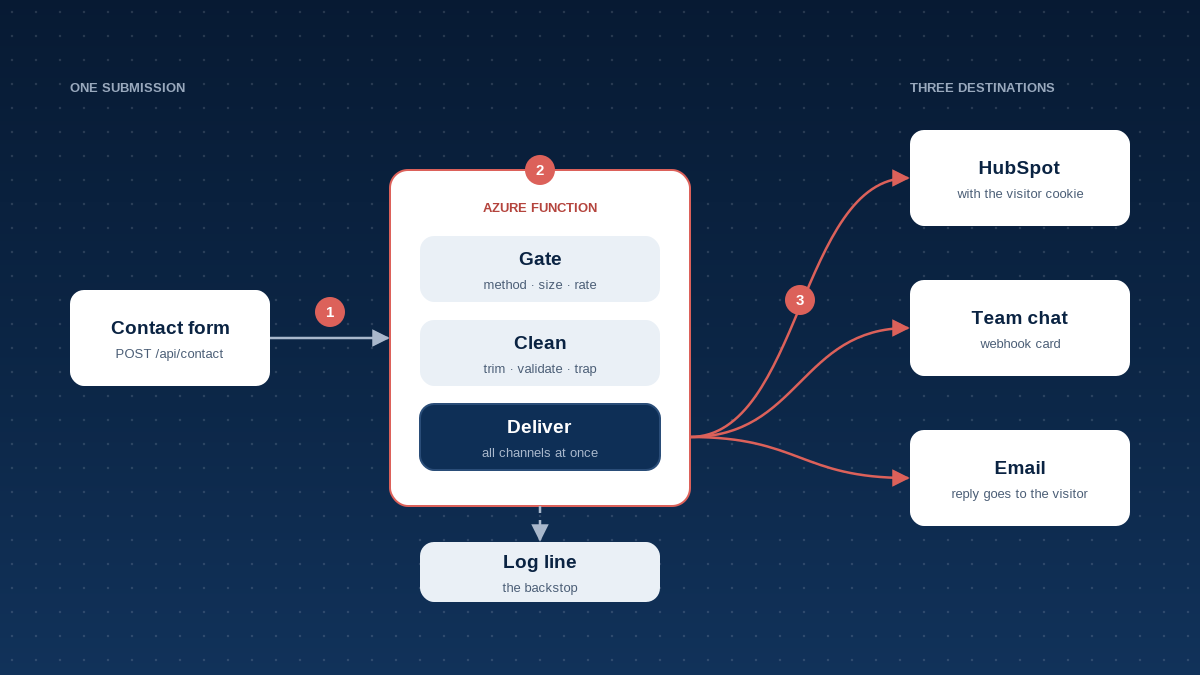
The big picture
Step by step
- The browser posts JSON. Before it does, a few lines of script read HubSpot's visitor cookie (
hubspotutk, already set by the tracking code) and add it to the payload. No extra script, no extra request. - The gate. POST only, a size cap, and a simple limit on how many submissions one address can make in a short window. Nothing clever. It exists to stop a script, not a determined person.
- Normalize. Every field is trimmed, stripped of control characters and capped in length. The email check is deliberately stricter than the standard allows, on the reasoning that a lead we can't reply to isn't a lead. A hidden field acts as a trap for bots; when it's filled, the function answers with a normal success and delivers nothing, so whatever filled it learns nothing. The visitor cookie is only forwarded if it has the shape HubSpot's cookie has.
- Deliver. Each channel is switched on by its own app settings. Every configured channel gets the lead, in parallel. For HubSpot that's a Forms API submission carrying the cookie and the page address in its context, which is what lets HubSpot attach the lead to that visitor's earlier page views.
- Log. One structured line per submission with the full lead and which channels succeeded. It's the only copy that exists regardless of configuration.
The fan-out, in code
This is the delivery function as it runs, lightly trimmed.
async function deliver(lead, env, log) {
  const jobs = [];
  if (env.CONTACT_WEBHOOK_URL) jobs.push(['webhook', () => toWebhook(env.CONTACT_WEBHOOK_URL, lead)]);
  if (env.HUBSPOT_PORTAL_ID && env.HUBSPOT_FORM_GUID) jobs.push(['hubspot', () => toHubSpot(env.HUBSPOT_PORTAL_ID, env.HUBSPOT_FORM_GUID, lead)]);
  // ...email is added the same way

  const delivered = [], failed = [];
  await Promise.all(jobs.map(async ([name, run]) => {
    try { await run(); delivered.push(name); }
    catch (err) { failed.push(name); log.error(`contact: ${name} failed: ${err.message}`); }
  }));
  return { delivered, failed, configured: jobs.length };
}
The caller turns that into a response. If at least one channel delivered, the visitor sees success. Only when every configured channel failed do they see an error and a request to try again. Each outbound call has a timeout of a few seconds so one slow service can't hold the form hostage.
Why not a queue?
The textbook design puts the lead on a queue and has a worker deliver it with retries. We'd build that for a client taking hundreds of submissions a day. For a consultancy's contact form it's more moving parts than the problem deserves, so we went with two cheaper protections: more than one destination, and the log line.
| Design | Good at | Costs you |
|---|---|---|
| Parallel fan-out (ours) | No infrastructure, instant feedback to the visitor, survives one channel being down | A failed channel isn't retried; you reconcile from the log by hand |
| Queue and worker | Automatic retries, nothing lost if a channel is down for an hour | A queue, a worker, a dead-letter process, and someone to watch them |
| Embedded HubSpot form | Zero code, tracking handled for you | HubSpot's markup and styling, and HubSpot as the only destination |
What's not pretty
A few things we'd rather tell you than have you find.
The rate limit lives in the function's memory. That means it's per instance and forgets everything on a restart. For this traffic it does its job. For a busy public endpoint we'd move it to the platform's edge and stop pretending.
We only send HubSpot the properties every portal already has, so the function works against a brand-new portal with no custom fields. The price is that the form's extra answers (what the person wants fixed, how soon) get appended to the message text. Readable for a human, useless for a report.
And the name handling is crude: first word is the first name, the rest is the last name. Anyone with a two-word first name gets split in the wrong place. We know. It hasn't yet been worth a "first name / last name" pair of boxes on a form we want to keep short.
Conclusion
None of this is sophisticated, and that's rather the point. The parts that matter are small: pass the visitor cookie, send to more than one place, keep one copy you control. If you're wiring a custom form to HubSpot, start with those three and add the queue when the volume earns it.
Two companion pieces: a ten-minute test any owner can run on their own form, and how to check inside HubSpot that leads arrive with their history.