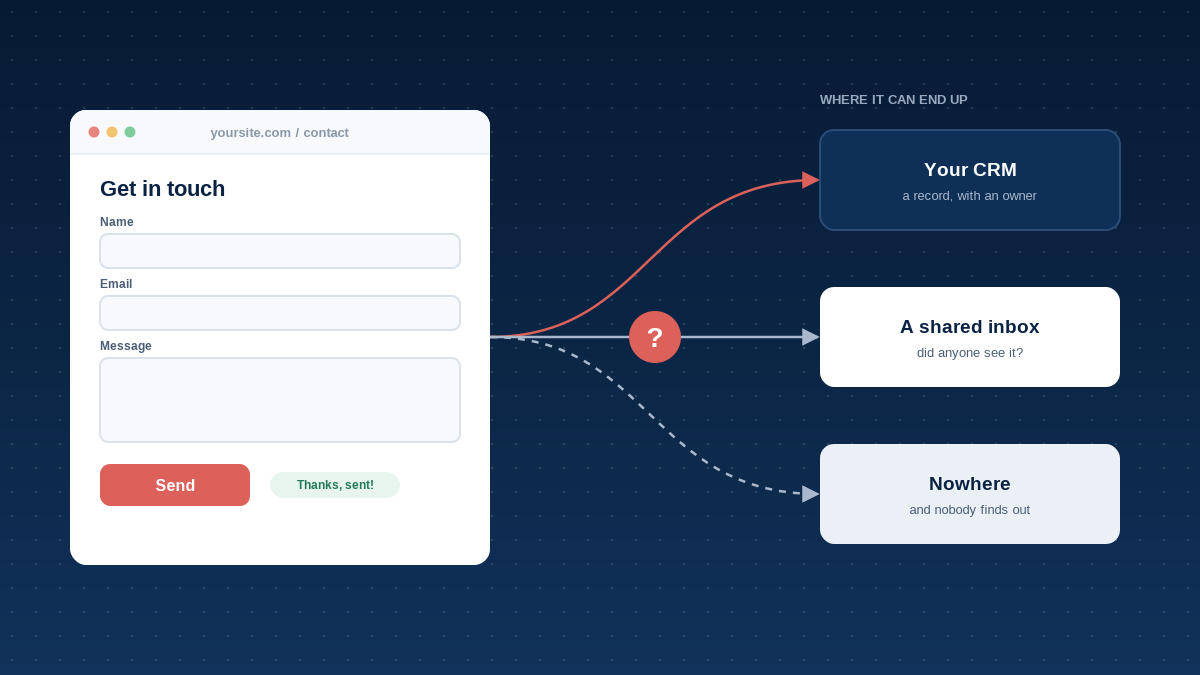
When we built our own website, the contact form itself was the quick part. Deciding what happens after someone presses Send took a good deal more thought, and it's the part we'd tell any owner to go and check on their own site today.
Here's why. A form that looks fine and says "Thanks, we'll be in touch" tells you nothing about where the message went. It might be in your CRM. It might be in the inbox of someone who left in March.
The problem
Most contact forms send the message to exactly one place, usually an email address somebody typed in when the site was built. That works until that one place has a bad day. The mailbox fills up, the spam filter gets keen, the person is on holiday, or the plugin that connects the form to the CRM quietly stops after an update.
Nobody finds out, because the visitor still sees the thank-you message. From the outside the form works. You only learn about it when a customer says "I wrote to you two weeks ago" (and most of them don't say it, they just go elsewhere).
What we did on our own site
We set ours up so a single message is delivered to several places at the same moment: our CRM, plus a team channel and an email address we can switch on. The visitor only sees an error if every one of them fails, and there's a backstop copy on our side for the day everything is misconfigured at once. The technical write-up has the details.
Where this isn't perfect
Sending a lead to three places means three places can each think someone else has replied. More copies do not make anyone responsible. You still need one named person who owns new inquiries. No amount of plumbing replaces that.
It also took real work. A form that emails one address comes free with most website builders. What we have is a small piece of custom code, which is fine for us because building this is our job. For plenty of businesses a HubSpot form with a notification to two people gets most of the benefit for none of the effort, and that's what we'd suggest first.
One thing to do this week
Take out your phone, go to your own website, and fill in the contact form as if you were a customer. Use a personal email address. Then watch:
- Where did it show up, and how long did that take?
- Who saw it first? Did they know it was theirs to answer?
- Is it in your CRM, with your name on it, or only in an inbox?
- When did you, the "customer", hear back?
Ten minutes. If the answer to the first question is "I'm not sure", you've found something worth fixing before you spend another dollar on getting people to the site.
If someone on your team runs HubSpot, here is the same test with the steps to check inside HubSpot.