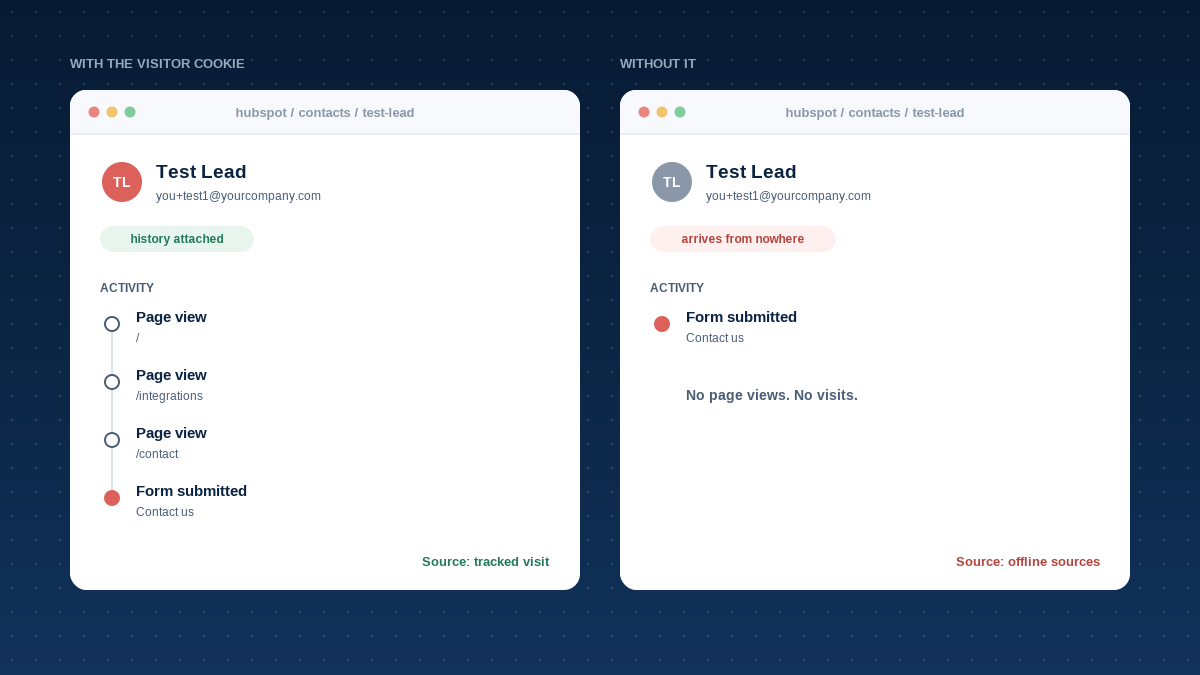
Your website form creates contacts in HubSpot. Good. But do those contacts arrive with the pages they read before they wrote to you, or do they show up from nowhere? We had to answer that for our own site, and the test we used takes about twenty minutes in any portal.
Why this goes wrong
HubSpot recognises a visitor by a cookie its tracking code sets in their browser. When a form submission carries that cookie along, HubSpot can join the new contact to everything that browser did before: the pages, the visits, where they came from. When it doesn't, you get a contact with a name, an email and no past.
A form built in HubSpot and embedded on your site handles this for you. The trouble starts with anything else: a form from your website builder, a plugin, or custom code that sends data to HubSpot through its API. HubSpot's own documentation says an API submission should carry the tracking cookie plus the URL of the page. That is exactly the bit that gets left out.
Ours is the custom kind, so we had to pass the cookie along ourselves.
It's a few lines of code. It's also easy to forget, and nothing breaks when you do: the contacts still appear, looking perfectly healthy in a list view, and it's only when you open one that you notice the timeline starts at the moment they wrote in.
Step by step
- Find out which kind of form you have. In HubSpot, open the forms list (under Marketing in most portals). If your website form is listed there as a HubSpot form, you're in the easy case. If it shows up as a non-HubSpot form, or doesn't show up at all, keep going carefully.
- Check the tracking code is on the page. View the page source on your site and search for your Hub ID followed by
.js(it sits in a script address containinghs-scripts.com). No tracking code means no cookie, and no cookie means nothing to join. If the code is loaded through a tag manager it won't be in the page source, so use the checker on HubSpot's tracking code settings page instead: you give it a page address and it emails you the result. It can report a false failure when a cookie banner gets in its way. - Open a private window. This matters more than it sounds. See the warning below.
- Behave like a visitor. Land on your home page, read two or three other pages, wait a few seconds on each, then go to the contact form. If your site shows a cookie banner that asks before tracking, accept it first. Otherwise you're testing what a visitor who declined looks like, and that one is supposed to arrive blank.
- Submit with an address you've never used. Most mail providers let you add a tag, like
you+test1@yourcompany.com. Put "TEST" in the message so nobody replies to it. - Open the new contact in HubSpot. Give it a couple of minutes first.
Check that it worked
On the test contact, look for the pages you visited before the form submission. They show on the activity timeline as page views (you may need to switch them on in the timeline's filter), and the contact's web analytics properties, such as the number of page views and the first page seen, should be filled in too.
Then find the Original Traffic Source property. "Offline sources" is HubSpot's catch-all for contacts it couldn't tie to a tracked visit. On a lead that just came through your website, that value is the sign the cookie didn't arrive.
If the page views are there, the cookie is making it through. If the record starts at the form submission, it isn't.
While you're in there, check two more things, because a perfect history is no use if nobody acts on it. Does the contact have an owner? And did anyone get a notification? A contact nobody owns and nobody heard about is not much better than a lost email.
Mistakes to avoid
| Mistake | What it causes | Do this instead |
|---|---|---|
| Testing from your everyday browser | Test data merges into a real contact | Private window, new email tag each time |
| Custom form posts to HubSpot without the cookie | Contacts with no history and vague sources | Have your developer include the hubspotutk cookie and the page URL in every submission |
| Cookie banner blocks tracking until consent | Visitors who decline arrive without history, by design | Leave it. That's the banner doing its job, so expect some blank contacts |
| Form loads after the page, or the site is a single-page app | HubSpot's automatic capture of non-HubSpot forms can miss it | Use an embedded HubSpot form, or the API |
- Run the private-window test once after any website change, plugin update or cookie banner change.
- Filter contacts created in the last 30 days with no owner. That list should be empty.
Related: the short version of this for owners, and how our own form is built, with the code that passes the cookie.